Weather Plugin
Display current weather conditions on your board with temperature, conditions, UV index, and more.
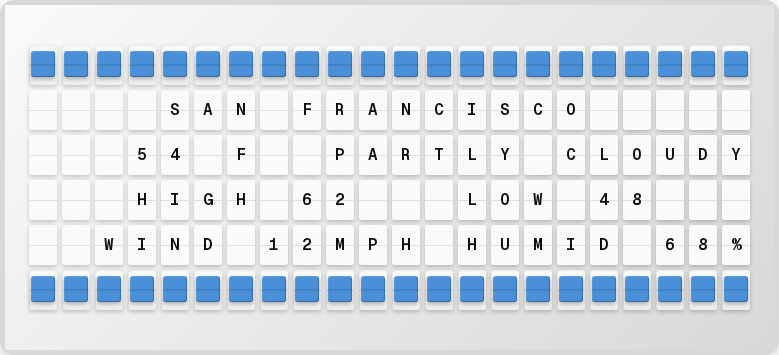
Overview
The Weather plugin provides real-time weather data for your location, including:
- Current temperature (°F or °C)
- Weather conditions (Sunny, Cloudy, Rain, etc.)
- High and low temperatures
- UV index
- Humidity
- Wind speed
Setup
1. Get an API Key
WeatherAPI.com (Recommended):
- Sign up at weatherapi.com
- Free tier: 1 million calls/month
- No credit card required
OpenWeatherMap (Alternative):
- Sign up at openweathermap.org
- Free tier: 1,000 calls/day
2. Enable and Configure in the Web UI
- Open http://localhost:4420
- Go to the Integrations page
- Toggle the Weather plugin on
- Enter your API key, choose your provider, and set your location
- Click Save Changes
tip
All plugin configuration is done through the web UI. You don't need to edit any .env files. The Integrations page saves your settings automatically.
Available Variables
| Variable | Description | Example |
|---|---|---|
{weather.temperature} | Current temperature | 72°F |
{weather.condition} | Current conditions | Sunny |
{weather.high_temp} | Today's high | 78°F |
{weather.low_temp} | Today's low | 58°F |
{weather.uv_index} | UV index | 6 |
{weather.humidity} | Humidity percentage | 65% |
{weather.wind_speed} | Wind speed | 12 mph |
Color Rules
The Weather plugin supports automatic color coding based on temperature:
| Temperature Range | Color | Code |
|---|---|---|
| ≥ 90°F (32°C) | 🟥 Red | {63} |
| 80–89°F (27–31°C) | 🟧 Orange | {64} |
| 70–79°F (21–26°C) | 🟨 Yellow | {65} |
| 60–69°F (16–20°C) | 🟩 Green | {66} |
| 45–59°F (7–15°C) | 🟦 Blue | {67} |
| < 45°F (< 7°C) | 🟪 Violet | {68} |
Weather Symbols
The board uses special characters for weather conditions:
| Symbol | Condition |
|---|---|
* | Sunny |
% | Partly Cloudy |
O | Cloudy |
/ | Rain |
! | Thunderstorm |
~ | Fog |
Example Page Layout
┌──────────────────────┐
│  SAN FRANCISCO  72*F │
│  SUNNY     H78  L58  │
│  UV 6   HUMIDITY 65% │
│                      │
│                      │
│                      │
└──────────────────────┘
Next Steps
- Plugins Overview - See all available plugins
- Color Guide - Learn about color formatting
- Character Codes - Board character reference